

Before you start
- A copy of Domain Hunter Gatherer, installed and licensed.
- A DomDetailer API key. Buy credits if you do not have one, or find your existing key on your account page.
- Pro licence holders can skip step 3 - 50,000 credits a month are included and configured for you.
01 Open the Settings tab
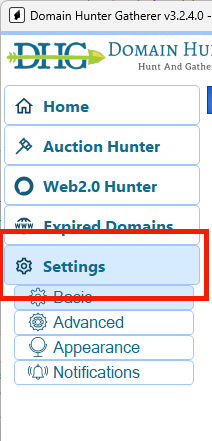
Start Domain Hunter Gatherer and click Settings in the left navigation list to open the settings panel.
02 Pro licence: check the defaults
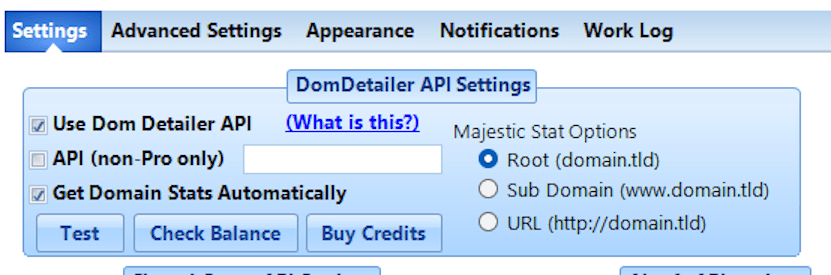
If you hold a Pro licence, DomDetailer is already configured and your monthly credit allowance is applied automatically. Confirm your settings match the ones shown here and you are finished — skip the next step entirely.
03 Everyone else: paste your API key
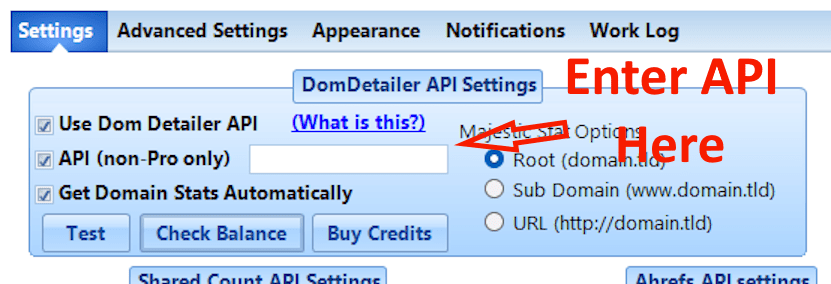
Without a Pro licence, DHG uses your own DomDetailer key and your own credits. Tick the options shown below and paste your key into the API field.
04 Save the settings
Click Apply and Save Settings. Changes are not kept if you close the panel without saving.
05 Run a search
That is the whole setup. From here on, any domain DHG surfaces arrives with its metrics already fetched, so you can sort and filter on Trust Flow, Domain Authority or Citation Flow before deciding what is worth a closer look.
If you are not sure which numbers to filter on, the field reference covers what each one is telling you and which combinations catch a manipulated profile.
Review your domain shortlist
Once setup is complete, you can check Domain Authority and Trust Flow in bulk in your browser, then inspect backlink samples, anchor text and source pages for the domains you want to investigate. The expired-domain vetting workflow explains how to turn an auction export into a shortlist for manual review.
Not working?
Check the key has no stray spaces, confirm you have credits left on your account page, and check the service status. If it is none of those, tell us what you tried and we will look.