

Before you start
- Scrapebox, with either the Expired Domain or Metrics premium addon installed.
- A DomDetailer API key. Buy credits, or find your key on your account page.
01 Open the addon
Start Scrapebox and open either the Expired Domain addon or the Metrics addon. Either one can use DomDetailer; the setup is identical.
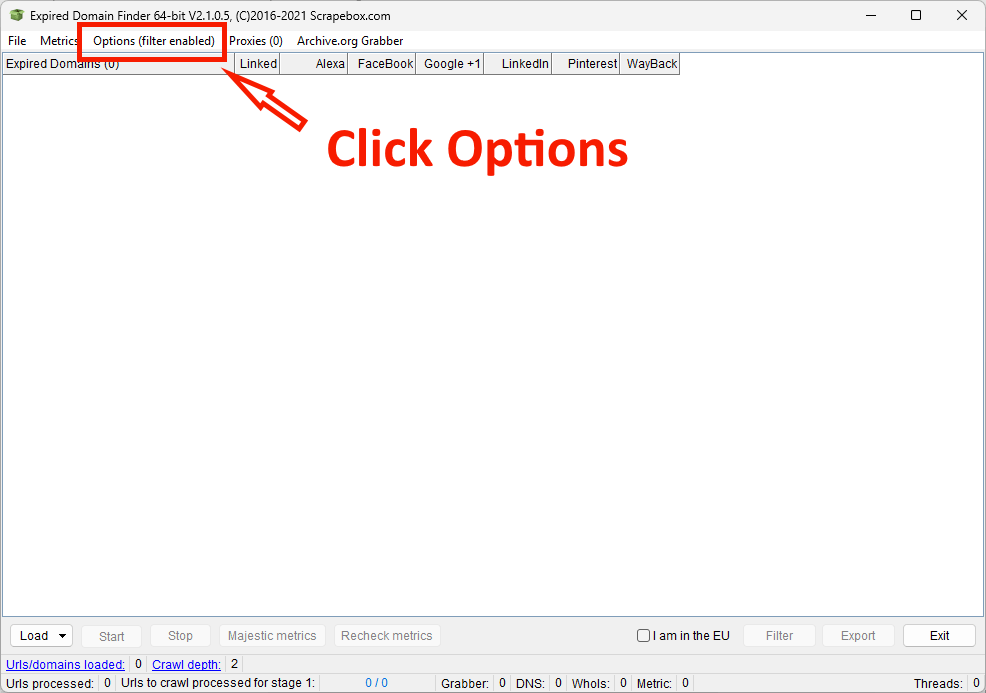
02 Open the Options menu
Click Options in the addon toolbar.
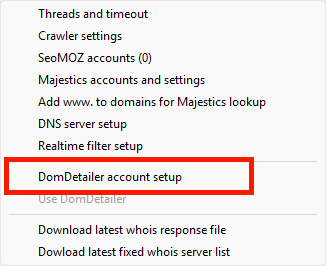
03 Choose DomDetailer account setup
From the dropdown, select DomDetailer account setup.
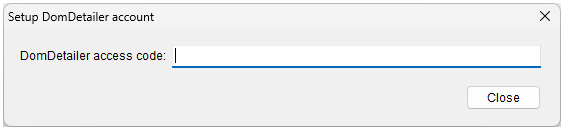
04 Paste your key and close
Paste your DomDetailer API key into the field and click Close. Scrapebox saves it automatically and will use it whenever it fetches domain metrics.
Review your domain shortlist
Once setup is complete, you can check Domain Authority and Trust Flow in bulk in your browser, then inspect backlink samples, anchor text and source pages for the domains you want to investigate. The expired-domain vetting workflow explains how to turn an auction export into a shortlist for manual review.
Not working?
Check the key has no stray spaces, confirm you have credits left on your account page, and check the service status. If it is none of those, tell us what you tried and we will look.