

Before you start
- A Servya subscription.
- No DomDetailer account is needed. Servya covers the metric cost within its own plans, which makes it the simplest route if you would rather not manage credits.
01 Sign up for Servya
Any Servya plan that includes the domain research tools carries DomDetailer metrics with it. There is nothing to connect and no key to paste.

02 Open the DomDetailer tool
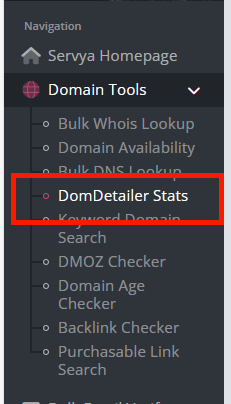
Once signed in, use the DomDetailer entry in the Servya navigation. Paste or upload your domain list and Servya fetches Moz, Majestic and Pretty metrics for each one.
03 Decide which route suits you
Servya is the better fit if you want a subscription that bundles several research tools together and would rather not think about credits at all.
A DomDetailer account direct is the better fit if you want to pay only for what you use, need the raw API for your own software, or want backlink rows rather than summary metrics. The pricing page lays out what that costs.
Review your domain shortlist
Once setup is complete, you can check Domain Authority and Trust Flow in bulk in your browser, then inspect backlink samples, anchor text and source pages for the domains you want to investigate. The expired-domain vetting workflow explains how to turn an auction export into a shortlist for manual review.
Not working?
Check the key has no stray spaces, confirm you have credits left on your account page, and check the service status. If it is none of those, tell us what you tried and we will look.